---
title: "API keys"
description: "Create, scope, and revoke the keys that authenticate API requests."
icon: "key"
---
> **For AI agents:** the complete documentation index is at [llms.txt](/llms.txt). Append `.md` to any page URL for its markdown version.
The **API Keys** page manages the keys your organization uses to call the API. From here you
create and revoke keys, scope them, set expiration and allowed IPs, and view per-key and
org-wide usage. A key's secret is shown once, at creation, and never again.
This page covers configuring keys in the console. For how a key authenticates a request, and
how scopes work, see [Authenticating with API keys](/platform/api-keys) and
[Resource filters](/platform/resource-filters).
The page appears only after your organization is **bootstrapped** for API keys: a one-time
setup that provisions the key-signing infrastructure.
## Creating a key
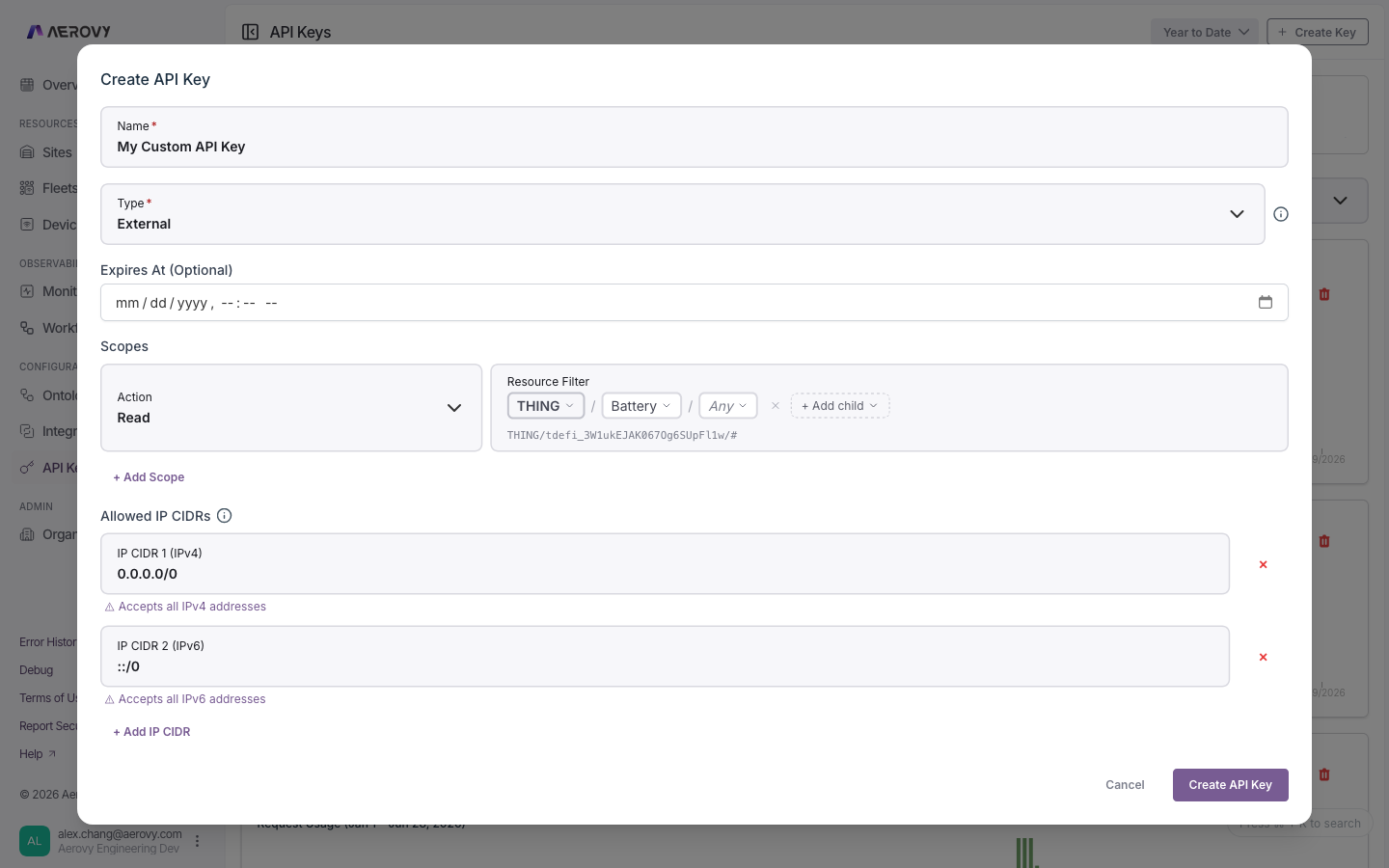 | Field | Type | Required | Notes |
|-------|------|----------|-------|
| Name | string | Yes | Label for the key |
| Expires at | date-time | No | Leave blank for no expiry |
| Scopes | list | Yes | One or more `action` + `resource filter` pairs |
| Allowed IP CIDRs | list | No | Defaults to allow-all (`0.0.0.0/0` and `::/0`) |
### Scopes
Each scope is an **action** plus a **resource filter**.
| Action | Meaning |
|--------|---------|
| `read` | Read access |
| `write` | Create, update, delete |
| `admin` | Administrative actions |
| `*` | Any action |
The resource filter limits which resources the action applies to. Clear it to mean all
resources (`*`). See [Resource filters](/platform/resource-filters) for the path syntax.
### Allowed IPs
Restrict a key to specific networks with CIDR ranges. IPv4 and IPv6 rules are matched
independently. A wildcard range (`0.0.0.0/0` or `::/0`) accepts all addresses of that
version, which the form flags with a warning.
## States
### Key status
| Status | Meaning |
|--------|---------|
| `Active` | Usable |
| `Expired` | Past its expiration |
| `Revoked` | Permanently disabled |
Filter the list by status (default: Active), and search by name.
### One-time secret
After you create a key, its secret value is shown **once**. You must acknowledge that you've
copied it before continuing. The secret is never retrievable again. If you lose it, revoke the
key and create a new one.
### Editing and revoking
- Editing scopes or allowed IPs can immediately break calls made with that key. The form
warns before you save.
- Revoking a key is permanent. To remove a key, revoke it.
## Coming soon: short-lived access tokens
We're adding the ability to exchange your API key for a **short-lived access token** — a more
secure way to authenticate your API requests.
Instead of sending your API key on every call, you'll send it once to a token endpoint, receive
a token valid for a few minutes, and use that token as a `Bearer` credential. Your long-lived
key stays in one place, and any token that leaks expires almost immediately.
**How it will work**
1. **Get a token** — `POST /oauth/token` with your API key.
2. **Call the API** — send the token as `Authorization: Bearer `.
3. **Renew** — request a new token when the current one expires (about every 10 minutes).
Because this follows the standard OAuth 2.0 client-credentials flow, existing OAuth client
libraries will work without custom code. Your current API-key authentication will continue to
work unchanged — adopting tokens will be optional.
| Field | Type | Required | Notes |
|-------|------|----------|-------|
| Name | string | Yes | Label for the key |
| Expires at | date-time | No | Leave blank for no expiry |
| Scopes | list | Yes | One or more `action` + `resource filter` pairs |
| Allowed IP CIDRs | list | No | Defaults to allow-all (`0.0.0.0/0` and `::/0`) |
### Scopes
Each scope is an **action** plus a **resource filter**.
| Action | Meaning |
|--------|---------|
| `read` | Read access |
| `write` | Create, update, delete |
| `admin` | Administrative actions |
| `*` | Any action |
The resource filter limits which resources the action applies to. Clear it to mean all
resources (`*`). See [Resource filters](/platform/resource-filters) for the path syntax.
### Allowed IPs
Restrict a key to specific networks with CIDR ranges. IPv4 and IPv6 rules are matched
independently. A wildcard range (`0.0.0.0/0` or `::/0`) accepts all addresses of that
version, which the form flags with a warning.
## States
### Key status
| Status | Meaning |
|--------|---------|
| `Active` | Usable |
| `Expired` | Past its expiration |
| `Revoked` | Permanently disabled |
Filter the list by status (default: Active), and search by name.
### One-time secret
After you create a key, its secret value is shown **once**. You must acknowledge that you've
copied it before continuing. The secret is never retrievable again. If you lose it, revoke the
key and create a new one.
### Editing and revoking
- Editing scopes or allowed IPs can immediately break calls made with that key. The form
warns before you save.
- Revoking a key is permanent. To remove a key, revoke it.
## Coming soon: short-lived access tokens
We're adding the ability to exchange your API key for a **short-lived access token** — a more
secure way to authenticate your API requests.
Instead of sending your API key on every call, you'll send it once to a token endpoint, receive
a token valid for a few minutes, and use that token as a `Bearer` credential. Your long-lived
key stays in one place, and any token that leaks expires almost immediately.
**How it will work**
1. **Get a token** — `POST /oauth/token` with your API key.
2. **Call the API** — send the token as `Authorization: Bearer `.
3. **Renew** — request a new token when the current one expires (about every 10 minutes).
Because this follows the standard OAuth 2.0 client-credentials flow, existing OAuth client
libraries will work without custom code. Your current API-key authentication will continue to
work unchanged — adopting tokens will be optional.